
GMB Everywhere for local SEO and competitor analysis is positioned as an all-in-one Chrome extension for business owners, marketers, and SEO professionals who want a faster way to inspect Google Business Profile data, compare competitors, and improve local visibility. It brings together auditing, category discovery, review insights, post analysis, and AI-assisted content tools in one place.
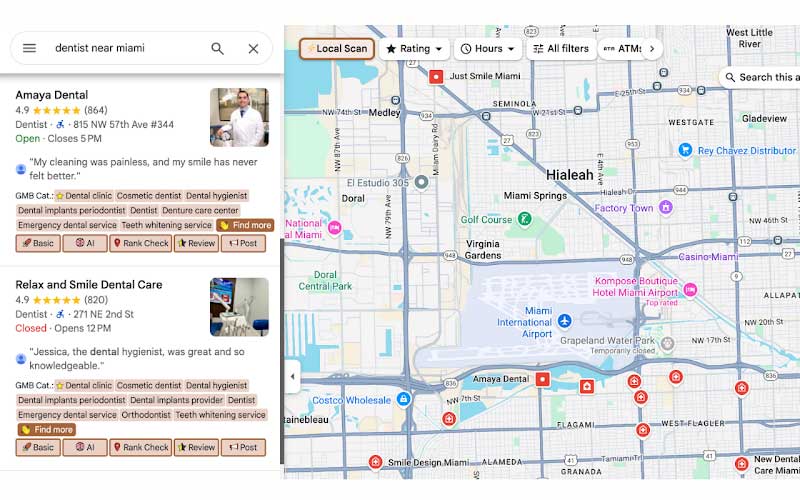
For anyone working in local search, the appeal is obvious: instead of jumping between multiple tools, GMB Everywhere places useful business intelligence directly inside Google Maps and Google search results. That makes it easier to evaluate a listing, spot gaps, and understand what top-ranking businesses are doing differently.
What GMB Everywhere Does
GMB Everywhere is designed as a multi-purpose local SEO tool that works inside Google Maps, Google Search, the Google Maps business page, Google Local Finder, and single business pages. Once installed as a Chrome extension, it becomes visible in those environments and adds a range of buttons and insights to business listings.
The main idea behind GMB Everywhere for local SEO and competitor analysis is simplicity. A user can search for a business, open a listing, and immediately access useful data such as category information, audit details, review insights, and content tools without leaving the search page.
Easy installation and access
The extension is installed through the Chrome browser. After installation, users can visit Google Maps or Google Search and search for any business. From there, the tool becomes available right in the interface, making it easy to use during everyday local SEO research.
Where the tool appears
- Google Maps.
- Google search results.
- Google Maps business pages.
- Google Local Finder.
- Single business pages.
That wide visibility matters because it lets users analyze businesses wherever local search data appears.
Category Discovery and Comparison
One of the most practical features in GMB Everywhere for local SEO and competitor analysis is category discovery. When a business appears in Google Maps search results, the left-hand side of the screen shows the primary category with a star icon, along with the secondary categories.
This is valuable because categories play a major role in local SEO. Knowing which category a business has selected helps users understand how that listing is positioned in search. Seeing the secondary categories adds even more context, especially when comparing competing businesses in the same market.
Find more category ideas
The tool also includes a “Find more” button. This opens up related categories and services and allows direct comparison of categories. For local SEO work, that means a user can quickly identify category opportunities that may help a business match or exceed competitors.
In practice, this kind of category research can be useful when:
- reviewing a client’s current Google Business Profile.
- checking how competitors are categorized.
- looking for additional service angles.
- comparing category choices across similar businesses.
AI Tools for Content and Engagement
GMB Everywhere also includes AI-powered features that support content creation and customer engagement. These tools are built to help users work faster and produce useful business content without switching platforms.
The transcript mentions that the tool can create Google Business Profile posts, Facebook posts, review responses, and Q&A sections.
This is especially helpful for businesses that want to stay active online but do not have time to manually draft every piece of content from scratch. The AI button inside Google Maps search results gives users quick access to these features.
Why AI support matters in local SEO
For local SEO, consistency and activity are often important signals. A business that regularly updates posts, responds to reviews, and maintains a healthy Q&A section can look more active and better managed. GMB Everywhere simplifies that process by putting the drafting workflow inside the tool itself.
Rank Check for Local Visibility
Another useful feature is the rank check function. This lets users virtually “teleport” to a business location, enter a search term, choose a location, and run a local ranking check.
The result is a fast way to see which businesses rank best in that area for the chosen term. Instead of guessing how a business performs in a different neighborhood or city section, the user gets a location-based view of rankings.
How the rank check helps
This feature is especially useful when a business wants to understand:
- where it ranks in a specific area.
- which competitors dominate that location.
- how search visibility changes by neighborhood.
- whether a keyword performs differently from one place to another.
For agencies and consultants, that can make local SEO reporting more concrete and easier to explain.
Basic Audit and Business Profile Data
The basic audit feature gives a quick look at important Google Business Profile information. It is described as a comprehensive page of business insights that surfaces helpful details at a glance.
Among the data mentioned in the transcript are the Google review request link, Place ID, CID, business profile ID, business claim status, and other relevant details.
This kind of audit is useful because it saves time during profile research. Instead of manually searching for identifiers or checking business setup details across multiple places, a user can access core information in one view.
Why these details matter
For local SEO work, these identifiers and status indicators can help with:
- auditing profile ownership and setup.
- documenting business records.
- troubleshooting profile inconsistencies.
- preparing client-facing reports.
A basic audit may not be flashy, but it is often one of the most practical parts of a workflow.
Website Audit and GBP Match
GMB Everywhere also includes a website assessment focused on two key areas: GBP and website match, plus website quality. This helps users evaluate whether the website and Google Business Profile tell the same story.
The core question is simple: does the website say what Google says about the business?
That matters because consistency across business name, service focus, and general positioning can strengthen trust and reduce confusion. The website quality part also asks whether the site is built well for search engines and visitors.
What this assessment looks at
- Consistency between the GBP and the website.
- Search-engine friendliness.
- User experience.
- Search optimization.
In other words, the feature is meant to help businesses check whether their online foundation is aligned and usable.
Local Scan for Competitor Analysis
Local Scan is one of the strongest competitor analysis features mentioned in the transcript. It provides a competitive breakdown of a local market with a quick scan.
The tool uncovers category count distribution, business ranks against total categories, and the primary and secondary categories used by top competitors.
This makes it easier to understand how a local market is structured and where competitors are gaining an advantage. Instead of manually comparing listings one by one, the user can see the market more clearly.
What Local Scan helps reveal
- Category patterns across top-ranking businesses.
- Your client’s position against the market.
- Which services competitors emphasize.
- Opportunities to improve category alignment.
That broader market view is useful when building a strategy around visibility and relevance.
Review Audit and Post Audit
GMB Everywhere also includes review and post analysis tools. These features are helpful for understanding how a business is perceived and how actively it uses Google posts.
Review audit
The review audit button helps track review trends and identify the most commonly used words in published reviews on any Google Business Profile. This gives a better sense of customer language, sentiment patterns, and recurring themes.
For local marketers, this can be useful when reviewing a competitor’s reputation, identifying common praise or complaints, understanding how customers describe the business, and spotting wording that could inform content or service messaging.
Post audit
The post audit feature shows how Google posts are being made. It includes analysis based on total number of posts, posting dates, cumulative post trends, and other relevant profile details.
This helps users evaluate whether a business is posting consistently and how its content activity develops over time.
Why This Tool Stands Out
GMB Everywhere is built around convenience. Instead of treating audits, category research, competitor analysis, and AI content creation as separate tasks, it combines them into one Chrome extension.
That makes it easier to review a business quickly, compare competitors inside Google Maps, evaluate categories and services, check location-based rankings, and create or respond with AI-assisted content.
For local SEO workflows, this kind of all-in-one setup can save time and reduce friction.
Conclusion
GMB Everywhere for local SEO and competitor analysis offers a practical mix of audit tools, category discovery, AI content support, ranking checks, and competitor insights inside Google Maps and Google search. It is designed to help users work faster while keeping the research process close to the places where local visibility actually happens.
The best feature, in my view, is the ability to check a competitor’s additional and secondary categories. That part is especially useful for understanding how top businesses are positioned, and it is free to use. It is also a tool I guide participants to use in my SEO course, especially in the local SEO chapter, because it gives a clear and practical way to study the competition and improve strategy.